


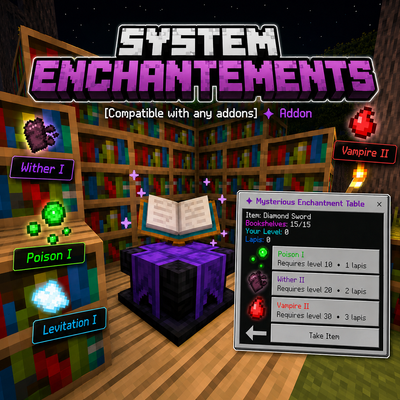
System Enchantements
With this addon that will add an enchantment table that will allow you to use new enchantments for your vanilla tools and also with...
✨ System Enchantments V2.0.3
Compatible with other addons • Realms • Multiplayer
🚫 Does not use player.json
🌐 Official StvAddons Page • 🚀 Discord Server
✨ System Enchantments
System Enchantments expands Minecraft Bedrock's enchanting system with a new Mysterious Enchantment Table, custom enchantments, random vanilla-style offers, bookshelf power, Lapis Lazuli costs, enchantment rarities and support for compatible equipment from other addons.
Instead of opening a menu and choosing any enchantment directly, the addon works closer to the vanilla Enchantment Table.
Your bookshelves, experience level and personal enchantment seed decide which offers appear.
Main Features
- ✨ 19 custom enchantments
- 🪄 Mysterious Enchantment Table
- 🔮 3 random enchantment offers
- 📚 Up to 15 active Bookshelves
- 📖 Supports normal and Chiseled Bookshelves
- 💎 Uses Lapis Lazuli
- ⭐ Vanilla-style level requirements
- 🎲 Personal enchantment seed for each player
- 🎁 Stronger offers can include a bonus enchantment
- 💎 Common, Uncommon, Rare and Legendary enchantments
- 📘 Complete in-game guide
- 🧩 Custom equipment manager for other addons
- 🛡️ Improved custom armor, tools and shield support
- 🧱 Your item is visually displayed above the table
- 🔐 Safe item storage system
- ✨ New visual effects and particles
- 🌐 Translated interface
- 🚫 No player.json
🆕 Latest Update - Custom Equipment Manager
This update improves compatibility with tools, weapons and armor from other addons.
Before, custom equipment support depended mostly on automatic detection. That worked for many items, but some addons use unusual item IDs or components, so certain items could be ignored or detected incorrectly.
Now the guide includes a Custom Equipment section where you can register compatible items directly from your inventory.
What changed?
- Added a Custom Equipment Manager inside the System Enchantments Guide.
- The guide now lists custom items found in your inventory.
- You can select an item and choose how System Enchantments should treat it.
- Unsupported items are rejected instead of being registered incorrectly.
- Registered items are saved in the world.
- Registered items can be reviewed and removed later.
- Armor pieces can be assigned to their correct armor slot.
- Weapons and tools can be manually registered.
- Shields can also be recognized for supported enchantment behavior.
- Better support for vanilla items like maces, spears, tridents and custom tools.
This makes the addon much easier to use with equipment from other addon packs.
🧩 Custom Equipment Support
System Enchantments is not limited to vanilla items.

Compatible custom equipment from other addons can also use System Enchantments if the item is supported by the system.
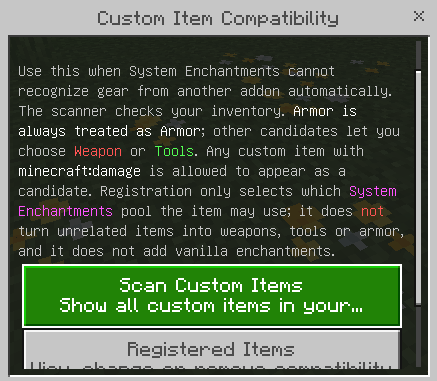
Supported custom categories
You can register or detect items as:
- Weapon
- Tools
- Helmet
- Chestplate
- Leggings
- Boots
- Elytra
- Shield
The addon also checks useful item signals such as enchantable slots, durability, digger components, combat components, wearable components, item tags and common equipment names.
This helps avoid registering random items like books, menus, food, potions or configuration items.
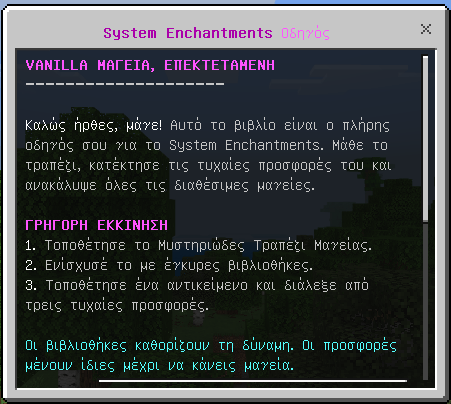
📘 In-Game Guide
Every player receives the guide once when joining.
The guide is kept after death and can also be crafted again if needed.

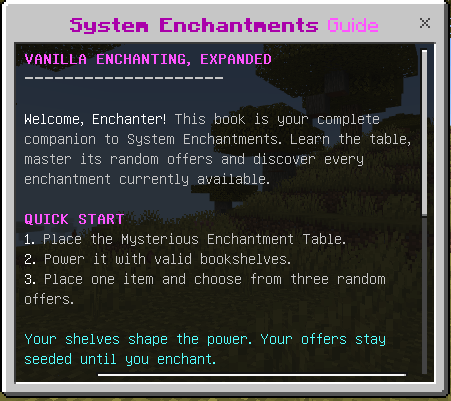
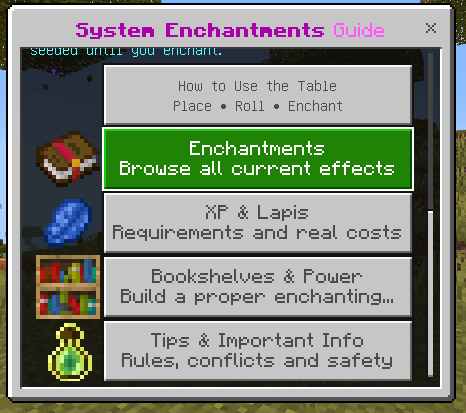
The guide includes:
- How to use the Mysterious Enchantment Table
- Enchantment list and categories
- XP and Lapis costs
- Bookshelf power
- Tips and important information
- Custom Equipment Manager
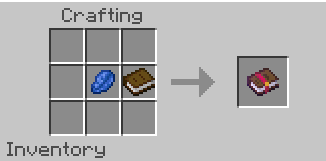
Lost Your Guide?
You can craft another one using:
- 1 Book
- 1 Lapis Lazuli
🌍 Translation Update
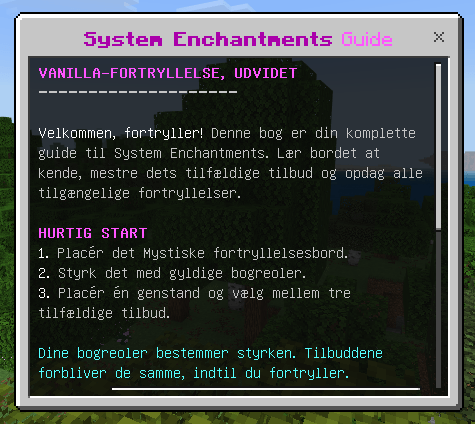
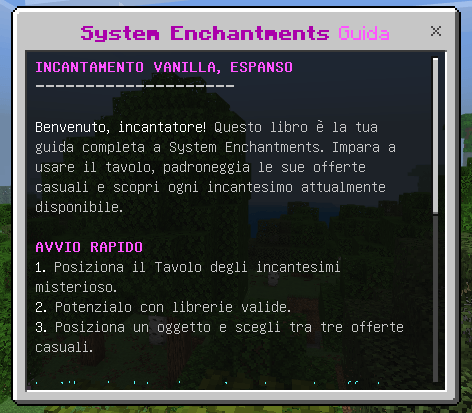
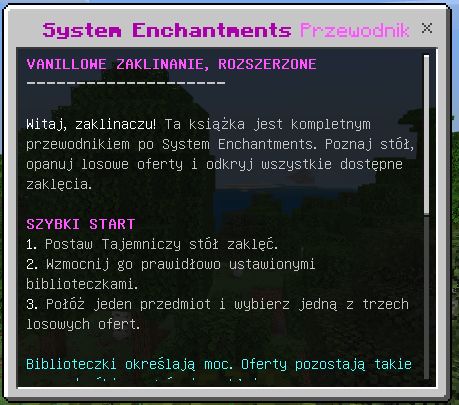
The interface has been translated into all languages officially supported by Minecraft Bedrock.
This includes:
- Enchantment Table UI
- Enchantment names
- Enchantment descriptions
- Guide pages
- Buttons
- System messages
- Categories
- Custom Equipment Manager text
Players can now use the addon in their preferred Minecraft language without most of the interface staying in English.
🪄 Mysterious Enchantment Table
The Mysterious Enchantment Table is the main block of the addon.
It behaves like a custom extension of the vanilla Enchantment Table, but with System Enchantments.
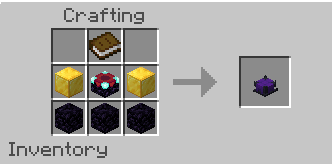
Crafting Recipe
You need:
- 1 Book
- 2 Gold Blocks
- 1 Enchanting Table
- 3 Obsidian
How does enchanting work?
1. Place the Mysterious Enchantment Table
Create your enchanting area and place Bookshelves around the table if you want stronger enchantments.
2. Hold a supported item
Hold the sword, tool, armor piece, Elytra or supported custom item you want to enchant and interact with the table.
3. Your item is stored
The real item is safely stored by the table while a visual copy appears above it.
4. Choose between three offers
The table generates three random enchantment offers based on your current enchanting power and personal enchantment seed.
5. Pay XP + Lapis Lazuli
You must meet the displayed experience requirement and have enough Lapis Lazuli.
6. Collect your enchanted item
After enchanting, take the completed item back from the table.
📚 Bookshelves & Enchanting Power
The Mysterious Enchantment Table can detect up to 15 active Bookshelves.
Supported bookshelf types:
- Bookshelf
- Chiseled Bookshelf
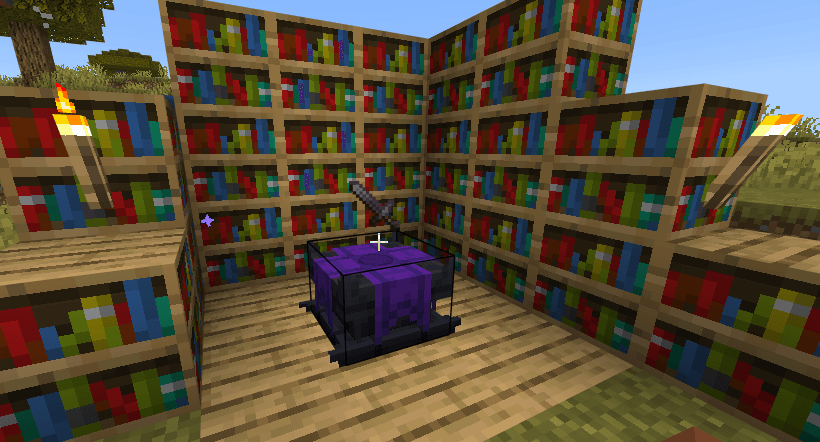
Bookshelves should be placed two blocks away from the table, leaving one clear air block between the table and the shelf.
They can be placed:
- At the same height as the table
- One block above the table
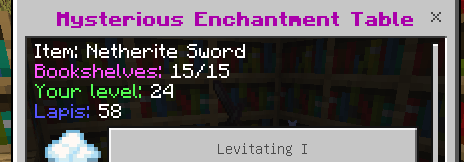
The more valid Bookshelves your setup has, the greater its Enchanting Power.
Higher enchanting power allows stronger and rarer enchantments to appear.
🔮 Three Random Offers
Every time a supported item is placed inside the table, you receive three enchantment offers.
The offers are generated using your own personal enchantment seed.
This means closing and reopening the table does not reroll your enchantments.
Your enchantment seed changes after successfully enchanting an item.
More powerful offer slots may also contain a bonus secondary enchantment, giving you the possibility of receiving more than one enchantment from a single enchant.
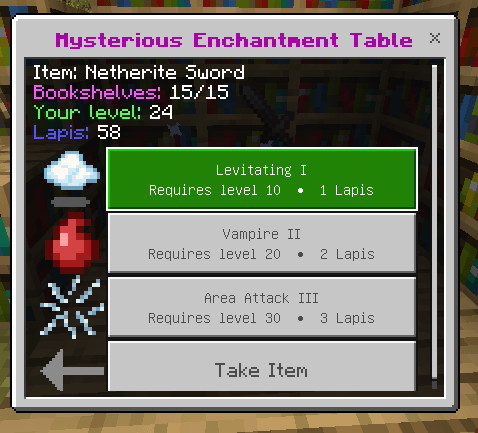
💎 Experience & Lapis Lazuli
System Enchantments follows the same basic idea as the vanilla Enchantment Table.
The level shown as a requirement is not the number of levels removed.
| Offer | Actual Level Cost | Lapis Cost |
|---|---|---|
| Offer I | 1 Level | 1 Lapis |
| Offer II | 2 Levels | 2 Lapis |
| Offer III | 3 Levels | 3 Lapis |
For example:
If Offer III says Requires Level 30, you must be Level 30 or higher to use it, but only 3 levels and 3 Lapis Lazuli are consumed.

🔐 Safe Item Storage
Your equipment is protected while using the Mysterious Enchantment Table.
- Only one item can be stored in a table at a time.
- The player who places the item owns that enchanting session.
- Other players cannot take control of the table while your item is stored.
- If the table is broken while an item is inside, the item is returned instead of being deleted.
✨ 19 Custom Enchantments
System Enchantments currently contains 19 enchantments divided between weapons, tools, armor and utility.
Rarer enchantments require stronger enchanting setups before they can appear.
⚔️ Sword Enchantments - 6
Poison III
Hits poison the target. Higher levels increase the strength and duration of the Poison effect.
Rarity: Common Item: Sword Maximum Level: III
Ice Aspect III
Heavily slows enemies after hitting them. Higher levels increase both the Slowness strength and duration.
Rarity: Common Item: Sword Maximum Level: III
Levitating III
Launches enemies upward when you hit them. Higher levels create a stronger launch and can cause more fall damage.
Rarity: Uncommon Item: Sword Maximum Level: III
Vampire III
Damaging enemies restores some of your health. Higher levels recover more health from each successful attack.
Rarity: Rare Item: Sword Maximum Level: III
Wither III
Attacks inflict the Wither effect. Higher levels increase its strength and duration.
Rarity: Rare Item: Sword Maximum Level: III
Area Attack III
When you damage an enemy, nearby entities can also receive damage. Higher levels increase the radius and secondary damage.
Rarity: Rare Item: Sword Maximum Level: III
⛏️ Tool Enchantments - 3
Magnetic III
Sneak while holding an enchanted tool to pull nearby dropped items toward you. Higher levels increase the collection radius.
Rarity: Uncommon Items: Axe, Pickaxe and Shovel Maximum Level: III
XP Collector III
Breaking blocks has a chance to grant additional experience. At Level III the bonus XP chance becomes guaranteed.
Rarity: Uncommon Item: Pickaxe Maximum Level: III
Furrowing III
Use an enchanted Hoe on valid dirt to instantly create a larger square of farmland.
- Furrowing I: 3x3
- Furrowing II: 5x5
- Furrowing III: 7x7
Rarity: Common Item: Hoe Maximum Level: III
🛡️ Armor Enchantments - 8
Night Eyes
Grants Night Vision while the enchanted helmet is equipped.
Rarity: Common Item: Helmet Maximum Level: I
Health III
Increases your maximum health while the enchanted equipment is equipped.
Rarity: Common Items: Chestplate and Elytra Maximum Level: III
Anti Magic
Continuously removes many common negative status effects while the enchanted leggings are equipped.
- Poison
- Wither
- Slowness
- Weakness
- Mining Fatigue
- Nausea
- Blindness
- Darkness
Rarity: Rare Item: Leggings Maximum Level: I
Fire Immune
Grants Fire Resistance while the enchanted leggings are equipped.
Rarity: Rare Item: Leggings Maximum Level: I
Water Impulse III
While wearing the enchanted leggings in water, sneak to launch yourself in the direction you are looking.
Rarity: Uncommon Item: Leggings Maximum Level: III
Agility III
Increases your movement speed while the enchanted boots are equipped.
- Agility I: Speed II
- Agility II: Speed III
- Agility III: Speed IV
Rarity: Common Item: Boots Maximum Level: III
Jump III
Allows you to jump significantly higher while the enchanted boots are equipped.
- Jump I: Jump Boost II
- Jump II: Jump Boost III
- Jump III: Jump Boost IV
Rarity: Common Item: Boots Maximum Level: III
Shared Damage III
When you receive damage while wearing an enchanted Chestplate or Elytra, part of that damage is returned to the attacker.
Rarity: Uncommon Items: Chestplate and Elytra Maximum Level: III
🪽 Utility Enchantments - 2
Impulse III
While airborne with an enchanted Elytra equipped, sneak to boost yourself in the direction you are looking.
Rarity: Uncommon Item: Elytra Maximum Level: III
Eternal
Items enchanted with Eternal remain with you when you die instead of being dropped.
Eternal is intentionally one of the rarest enchantments available from the table.
Rarity: Legendary Items: Most supported equipment, including compatible shields Maximum Level: I
💎 Enchantment Rarity
Not every enchantment has the same chance of appearing.
System Enchantments uses four rarity tiers:
- Common - more accessible enchantments.
- Uncommon - more specialized enchantments.
- Rare - stronger enchantments that need better setups.
- Legendary - extremely rare enchantments.
Eternal is currently the Legendary enchantment.
Increasing the number of valid Bookshelves expands the available enchantment pool and gives stronger magic a chance to appear.
🛡️ Smarter Equipment Effects
Passive enchantments only stay active while the correct enchanted equipment is equipped.
Examples:
- Night Eyes
- Health
- Fire Immune
- Agility
- Jump
Removing the equipment removes the effect.
The system also handles compatible external potion effects carefully when possible, so matching effects from other sources are not simply erased by equipment changes.
Anti Magic works differently because its purpose is to remove supported negative effects.
🧩 Supported Equipment
The current enchanting system supports:
- Swords
- Axes
- Pickaxes
- Shovels
- Hoes
- Helmets
- Chestplates
- Leggings
- Boots
- Elytra
- Compatible shields for supported behavior
✅ Addon Compatibility
No player.json
System Enchantments does not use player.json, making it easier to combine with other Minecraft Bedrock addons.
Custom Equipment
The new Custom Equipment Manager helps register tools, weapons and armor from other addons directly in-game.
Custom Tags
Addon creators can also improve compatibility by using supported tags such as:
system_enchantments:swordsystem_enchantments:combat_weaponsystem_enchantments:axesystem_enchantments:pickaxesystem_enchantments:shovelsystem_enchantments:hoesystem_enchantments:helmetsystem_enchantments:chestplatesystem_enchantments:leggingssystem_enchantments:bootssystem_enchantments:elytrasystem_enchantments:shield
📦 Installation
Install both packs:
- System Enchantments BP/BH - behavior, scripts and mechanics
- System Enchantments RP/RS - textures, models, particles and translations
Activate both packs in your Minecraft Bedrock world.
No experimental gameplay is required.
📜 Previous Update - System Enchantments V2
System Enchantments V2
V2 was a major rebuild of the addon and changed how custom enchanting works.
- Replaced the old category-based menu with a custom Enchantment Table system.
- Added 19 active custom enchantments.
- Added three randomized enchantment offers.
- Added bookshelf-based enchanting power.
- Added Lapis Lazuli enchanting costs.
- Added personal enchantment seeds.
- Added bonus enchantments on stronger offers.
- Added item display above the table.
- Added safe stored-item system.
- Added complete in-game guide book.
- Improved passive armor enchantment handling.
- Added new particles and feedback effects.
🚀 Join the Community
Want to report bugs, suggest ideas, follow development or commission your own custom Minecraft Bedrock addon?
🚀 Join my Discord Server
🌐 Official StvAddons Page
Want to see more of my Minecraft Bedrock addons?
🌐 Visit StvAddons
🎁 Support the Project
If you enjoy my addons and want to support future updates and development, donations are always appreciated.
💖 Donate via PayPal
Every contribution helps support the development of new addons and future updates.
⚠️ Reupload Policy
If you want to showcase System Enchantments in a review, video or external website, please link users to the official project page.
Do not create your own direct download links or redistribute the addon files.
Thank you for supporting the original project! ❤️
- Download v2.0.34v2.0.34Latest
Oct 20, 2026 · Bedrock 1.26.0+ · 342 KB
No comments yet.



