



XpTome
Have you ever wanted to save your experience so you don't lose it every time you die? Well, with this addon you can save, delete and...
📘 XpTome V2.0.9
✨ 4 Tome Tiers • Up to 1,000,000 XP • Multiplayer XP Transfer
✅ Realms • Multiplayer • 🚫 No player.json
🌐Officia Page • 🚀 Discord Server
📘 XpTome
Don't want to lose all your experience after dying?
XpTome lets you store your XP inside a personal Tome and recover it whenever you need it.
The new system stores real XP points instead of simply saving a level number, making transfers much more accurate at both low and high levels.
You can deposit XP, withdraw it, upgrade your Tome, quickly transfer XP with Sneak + Use, send XP directly to other players and eventually obtain a Soulbound XP Tome that stays with you after death.
⭐ Main Features
- 📘 Store your Experience safely inside a Tome
- ➕ Deposit XP
- ➖ Withdraw stored XP
- 🎯 Store by Levels or exact XP points
- 🔢 Quick options for 1, 5, 10 or 30 Levels
- ✍️ Enter your own custom amount
- 📥 Deposit All
- 📤 Withdraw All
- ⚡ Quick Transfer with Sneak + Use
- 📈 4 upgradeable Tome tiers
- 💎 Capacity up to 1,000,000 XP
- 💜 Final Soulbound XP Tome
- ☠️ Soulbound Tome is kept on death
- 👤 Every Tome has its own owner
- 🔄 Transfer Tome ownership to another player
- 🤝 Send stored XP directly to another player
- 📊 Dynamic XP progress bar in item lore
- ✨ Charged Tomes receive a visual glint
- 🔊 Optional sounds
- ✨ Optional particles
- 📜 Optional detailed lore
- ✅ Optional confirmations for large transfers
- 🔄 Automatic migration of old XP Tomes
- 📖 Complete in-game Help menu
- 🌐 English and Spanish translations
- 👥 Multiplayer & Realms friendly
- 🧩 Compatible with other addons
- 🚫 Does not use
player.json - 🧪 No experimental gameplay toggles required
🆕 What's New in V2.0.9?
XpTome has been completely modernized with a much more accurate and expandable XP storage system.
⭐ Major Improvements
- 🧮 XP is now stored as real Experience Points
- 📘 Added 4 different Tome tiers
- 📈 Added Tome upgrades and increasing capacities
- 💜 Added the final Soulbound XP Tome
- 🤝 Added Send XP for multiplayer
- 🔄 Added Tome ownership transfers
- ⚡ Added configurable Quick Transfer
- 🎯 Added exact XP transfers
- 🔢 Added Level-based transfers
- 📊 Added new detailed item lore and progress bars
- 🔊 Added configurable sounds and particles
- ✅ Added optional confirmation screens
- 📖 Added a complete in-game Help section
- 🔄 Added automatic migration for older XP Tomes
- 🛡️ Improved transfer safety to prevent XP from being incorrectly added or removed
🧮 Real XP Storage
One of the biggest changes in the new XpTome is how experience is stored.
Minecraft Levels do not all require the same amount of XP.
For example, gaining one level at a very high level costs much more XP than gaining one level when you are just starting.
Because of this, XpTome now stores:
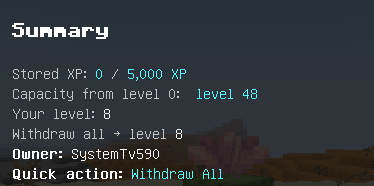
Actual XP Points
instead of simply storing a number of levels.
This makes depositing and withdrawing XP much more accurate.
📥 Deposit XP
Open your Tome and select Deposit XP.
You can choose:
- 1 Level
- 5 Levels
- 10 Levels
- 30 Levels
- Custom Levels
- Custom XP
- All
When choosing Levels, XpTome automatically calculates the correct amount of real XP that should be removed from your current experience.
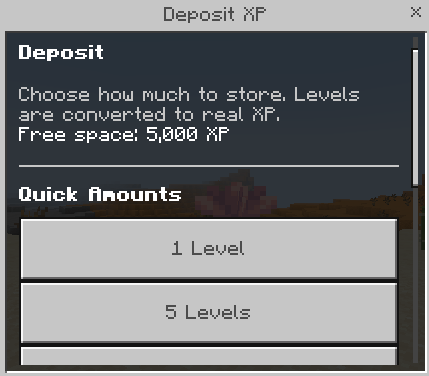
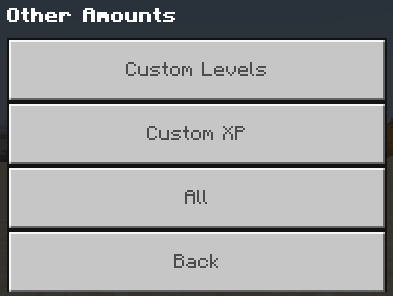
You can also enter an exact number of XP points if you want full control.
📤 Withdraw XP
Stored XP can be recovered at any time.
You can withdraw:
- 1 Level
- 5 Levels
- 10 Levels
- 30 Levels
- Custom Levels
- Custom XP
- All Stored XP
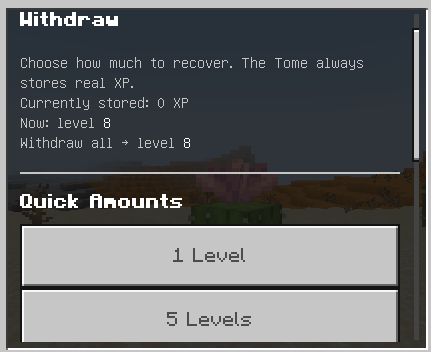
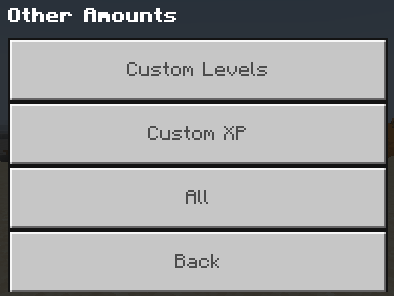
Before withdrawing everything, the menu can show what level you will reach after recovering all stored XP.
This makes it much easier to know exactly what you're getting back.
📈 4 XP Tome Tiers
Your first Tome is only the beginning.
XpTome now includes four progression tiers, each with a much larger XP capacity.
| Tome | Maximum Capacity | Approx. Level From 0 |
|---|---|---|
| 📘 XP Tome I | 5,000 XP | Level 48 |
| 💎 XP Tome II | 25,000 XP | Level 91 |
| 🔥 XP Tome III | 100,000 XP | Level 166 |
| 💜 Soulbound XP Tome | 1,000,000 XP | Level 489 |

Your stored XP, ownership and Tome information are preserved when upgrading.
⬆️ Upgrade Your Tome
You can upgrade your Tome directly from its menu.
Each tier requires increasingly valuable Survival materials.
💎 XP Tome II
Upgrade cost:
- 💎 4 Diamonds
- ✨ 8 Bottles o' Enchanting
Capacity:
25,000 XP
🔥 XP Tome III
Upgrade cost:
- 💎 2 Diamonds
- 🔥 4 Blaze Rods
- 🟣 4 Ender Pearls
Capacity:
100,000 XP
💜 Soulbound XP Tome
The final upgrade.
Requires:
- ⭐ 1 Nether Star
- 🌌 4 Echo Shards
- 💎 4 Diamonds
Capacity:
1,000,000 XP
And it unlocks one very important bonus:
☠️ The Tome is kept after death.
💜 Soulbound XP Tome
The Soulbound XP Tome is the final tier.
It can hold up to:
1,000,000 XP
which is approximately enough XP to reach Level 489 from Level 0.
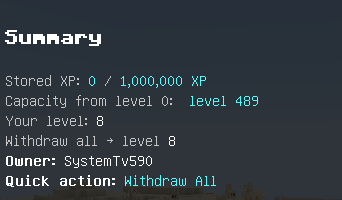
Unlike the previous tiers, the Soulbound Tome is marked as:
Soulbound • Kept on Death
This means the Tome remains with its owner after dying.
It is designed as the ultimate XP storage reward for players who have progressed far enough to craft the final upgrade.
👤 Personal Ownership
Every new XP Tome becomes bound to the first player who uses it.
Once claimed:
- The owner is stored inside the Tome
- Other players cannot use its stored XP
- The owner's name appears in detailed lore
- The Tome keeps its individual stored XP and upgrade tier
This makes XP Tomes much safer for multiplayer worlds.
🤝 Send XP to Other Players
You don't need to give away your Tome just to share XP.
V2.0.9 includes a dedicated:
Send XP
system.
Choose another online player and send them XP directly from the Tome.
You can send:
- 1 Level
- 5 Levels
- 10 Levels
- 30 Levels
- Custom Levels
- Exact XP
- All Stored XP
The receiving player immediately receives the transferred experience.
Your Tome remains yours.
🔄 Transfer Tome Ownership
Want to actually give your Tome to someone else?
The owner can use:
Transfer Tome
Select another online player and confirm the transfer.
The selected player becomes the new owner while the Tome keeps its:
- Stored XP
- Tier
- Capacity
- Tome data
After transferring it, the previous owner can no longer manage that Tome.
⚡ Quick Transfer
Don't want to open the menu every time?
XpTome includes a configurable Quick Transfer system.
Choose one of these actions:
- 🚫 Disabled
- 📥 Deposit All
- 📤 Withdraw All
- 📥 Deposit 5 Levels
- 📤 Withdraw 5 Levels
Then simply:
Sneak + Use the Tome
and the selected action will happen immediately.
This is especially useful when you frequently store XP before exploring, fighting bosses or entering dangerous areas.
⚙️ Tome Settings
XpTome includes personal settings so you can customize how the system feels.

Available options include:
⚡ Quick Transfer
Choose what happens when using Sneak + Use.
✅ Transfer Confirmations
Enable or disable confirmation screens when transferring all XP.
Useful if you want additional protection against accidentally depositing, withdrawing or sending everything.
📜 Detailed Lore
Show or hide additional Tome information.
✨ Effects
Control transfer feedback individually:
- Particles - ON/OFF
- Sounds - ON/OFF
📊 Smart Tome Lore
Your Tome can display useful information directly in its item description.
The lore can show:
- 👤 Owner
- 💎 Stored XP
- 📦 Maximum capacity
- 📈 Equivalent maximum level from Level 0
- 📊 Storage progress bar
- 💜 Soulbound status
Example progress:
[#####-----] 50%
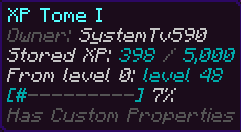
When XP is stored inside the Tome, the item also receives a glint effect, making charged and empty Tomes easier to distinguish.
📖 In-Game Help
You don't need to return to the CurseForge page every time you forget how something works.
The Tome includes a built-in How It Works section explaining:
- Basic Use
- Deposit & Withdraw
- Real XP Storage
- Quick Transfer
- Tome Upgrades
- Capacity
- Soulbound Tome
- Send XP
- Transfer Ownership
- Settings
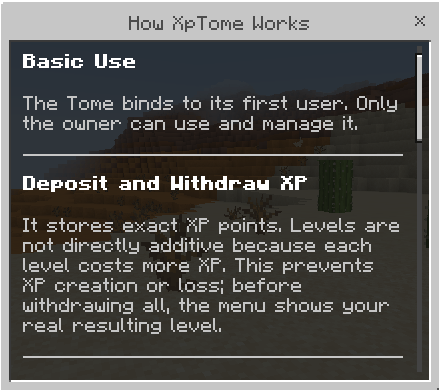
Everything can be checked directly inside Minecraft.
🔄 Old XP Tome Migration
Already used an older version of XpTome?
V2.0.9 includes a legacy migration system.
When the original owner uses an old compatible Tome, the addon can detect its previous stored Level value and convert it into the new real XP storage system.
The Tome is then upgraded to the appropriate new tier based on the amount of converted XP.
This allows existing players to move to the new system without simply losing their previously stored experience.
📘 Crafting Recipe
The first XP Tome is crafted at a Crafting Table.
You need:
- 📘 1 Book
- 🔵 4 Lapis Lazuli
- 💜 2 Amethyst Shards
- ✨ 2 Bottles o' Enchanting
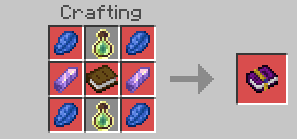
Once you have XP Tome I, higher tiers are obtained through the Tome's Upgrade menu.
🧩 Compatibility
🚫 No player.json
XpTome does not use player.json.
This greatly reduces conflicts with addons that modify:
- Player animations
- Player models
- Player behavior
- Player textures
- Other Script API systems
This makes XpTome suitable for larger addon packs.
👥 Realms & Multiplayer
XpTome is designed for multiplayer worlds.
The new version includes multiplayer-specific features such as:
- Individual Tome ownership
- Send XP
- Transfer Ownership
- Per-player settings
This also makes it useful for Survival servers and Realms.
🧪 Experimental Gameplay
XpTome uses the stable Script API.
No Experimental Gameplay toggles are required.
📦 Installation Guide
XpTome requires two packs:
- 📘 XpTome BP - behavior, scripts and XP mechanics
- 🎨 XpTome RP - textures, names and translations
Both packs are required.
Installation
- Import the XpTome BP
- Import the XpTome RP
- Activate both packs in your world
- Enter the world
- Craft an XP Tome
- Use it for the first time to claim ownership
XpTome V2.0.9 requires a compatible modern Minecraft Bedrock version.
No experimental gameplay settings are required.
📜 V2.0.9 Technical Improvements
Exact XP Handling
The storage system now rebuilds and verifies the player's exact total XP during transfers instead of relying on simple level subtraction.
This is especially important when a transfer crosses several Minecraft level boundaries.
Transfer Rollback Protection
If Minecraft cannot safely apply an XP change, XpTome attempts to restore the previous XP value instead of completing only half of the transaction.
Safer Tome Menus
Every Tome has an individual internal identifier.
If the Tome is moved or changed while one of its menus is open, the operation is stopped instead of modifying the wrong item.
Legacy Migration
Older compatible XP Tome lore is detected and converted from stored levels into the new XP-point system.
Owner Tracking
Tome ownership now uses persistent player information rather than relying only on visible item text.
💎 Save Your XP Before It's Too Late
XP can take a long time to earn.
Don't lose dozens of levels because of one bad fall, boss fight or unexpected Creeper.
Store what you've earned, upgrade your Tome and eventually unlock a storage item that stays with you even after death.
Store XP. Upgrade Your Tome. Keep Your Progress.
🚀 Join the Community
Want to report a bug, suggest an improvement, follow addon development or request a custom Minecraft Bedrock addon?
🚀 Join my Discord Server
On the Discord you can:
- Report bugs
- Suggest new features
- Follow addon development
- Get VIP access
- See exclusive progress
- Request custom commissions
🌐 Official STV Addons Page
Want to discover more Minecraft Bedrock addons and see new releases?
🌐 Visit STV Addons
🎁 Support the Project
If you enjoy XpTome and want to support future updates and new addon development, donations are always appreciated.
Every contribution helps me continue improving my projects.
💖 Donate via PayPal
⚠️ Reupload Policy
If you showcase XpTome in a video, review or external website, please send players to the official project page.
Do not redistribute the addon through your own direct download links.
Thank you for supporting the original project! ❤️
- Download v2.0.9v2.0.9Latest
Oct 20, 2026 · Bedrock 1.26.30+ · 23 KB
No comments yet.



